PUBG - Weapon Mastery Overhaul


Weapon Mastery Overhaul

Posted: 11 Mar 2022 12:03 AM PST

A lil somethin somethin: You can find the details for this event on the announcement page [url=https://steamcommunity.com/ogg/578080/announcements/detail/6051154755214386753]here[/url].

Weapon Mastery Overhaul

Posted: 11 Mar 2022 12:03 AM PST


Hello Players!

It's been a while since we've talked about our progression content, such as Survival Mastery and Weapon Mastery. We know that many of you have maxed out on these since their introduction, and with so many new players joining also, now's a great time to talk about what we have planned for this system going forward.

Progression is a critical fuel that motivates players to keep playing and striving for the next thing. With that in mind, we've come up with some updates and changes for Weapon Mastery that we've outlined below. Keep in mind that none of these proposed changes are final. We're eager to get your opinions and ideas first before we put any plans into action. 

Let's jump into it!


Details
Weapon Mastery Expert Level & Rewards

Upon reaching level 100 in a particular Weapon Mastery, players will now be able to reset their level in order to gain one Expert Level, earning a medal and an upgraded Weapon Nameplate along with it. 
  • Expert Levels
    • The most criticized point of the current Mastery Level is that it doesn't take long for experienced players to reach the highest level. Therefore, we have created two different levels that allow players to continue leveling up a weapon for additional rewards, rather than a simple one-time level system. Please note that the name "Expert Level" is not final.
  • Rewards
    • When a basic account switches to a Plus account, Weapon Mastery medals are provided retroactively.
    • Non-Plus accounts can still have Weapon Nameplates according to their levels.
    • With the introduction of Expert Levels, PUBG: BATTLEGROUNDS Plus players will receive Weapon Mastery medals on every Expert level up, in addition to an upgraded Weapon Nameplate. These are decorations that will allow a player to show off their Expert Level with that weapon. They will also receive visual upgrades to the kill message with every new Expert Level. Progressive weapons are not required for these.
  • Charms
    • Weapon Mastery Charms will be retroactively rewarded based on the highest level weapon after the update and will no longer be provided as Mastery Rewards. For example, if you have a level 50 M416 and a level 30 AKM, all Charms up to level 50 will be rewarded.
    • Charms can no longer be acquired through Weapon Mastery and instead can be acquired with BP or through other means.
    • Instead of being linked to the weapon you unlocked them with, owned charms can now be equipped to any weapon.
  • XP Count
    • We used the term "Defeat" as a way to track your knockdowns + opponents' final death in Squads and a kill in Solos. As many found this to be a confusing term, we've just gone ahead and changed it to "Kills."
Weapon Mastery Stats

Weapon Mastery records are completely reorganized for each weapon used in both Normal and Ranked matches. The current Mastery stats will no longer be updated. However, you will still be able to look up the old stats from a separate page. 
  • Intention
    • Current stats are a simple accumulation of records without comparing with other players' stats. The new stats are intended to provide an advanced type of information. For example, rather than just displaying the number of kills, we also plan to show details like the time spent to achieve a kill. 
Weapon Mastery UI/UX
  • Weapons List
This menu displays the player's weapons in kill order by game mode. Once the weapon category is selected, it will list the weapons by their number of total kills so that the player can easily see which type of weapons they are skilled at in combat. It will also show total headshots, total damage, total assists, and the time spent reaching these stats. Please note that Ranked stats are a PUBG: BATTLEGROUNDS Plus account exclusive feature.  
  • Kill message
A Weapon Nameplate that represents the player's Expert Level will be displayed in the kill message. Upgrade your Expert Level to enhance your Weapon Nameplate.
  • Universal Charms
We wanted to provide a Weapon Skin-like UI/UX for the Charms, as the ownership has moved from individual weapons to the player themself. Therefore, we have moved the Charms under the Customization menu. 

Again, none of these proposed changes are final. Since game progression is an essential factor for PUBG, we want to listen to your feedback on our proposed changes and begin development in April. We will continue to listen to your comments as we work and hope to have the new and improved Weapon Mastery available for you all around the July update.

See you on the Battlegrounds.

PUBG: BATTLEGROUNDS Team

Rocket League - Patch Notes: Season 6 Live

Link to Rocket League RSS Feed

Patch Notes: Season 6 Live

Posted: 09 Mar 2022 08:03 AM PST

Scheduled Release: 3/9/2022, 8 a.m. PST / 4 p.m. UTC

THE HEADLINES
  • Season 6 Rocket Pass, featuring the new car 'Nomad,' has begun
  • The 'Neo Tokyo (Comic)' Arena can be found in Online Playlists, Private Matches, and Free Play
  • Season 5 Rewards are dropping for all eligible players
  • Additional Patch Notes for the game update on March 8 (v2.12) can be found here

SEASON 6
Rocket Pass

  • Season 6 Rocket Pass, featuring the new car 'Nomad,' has begun
    • Nomad uses the Merc hitbox
Tournaments
  • Season 6 Tournaments are now available
  • Any unspent Season 5 Tournament Credits automatically convert into rewards
    • New: Tournament Credits have converted to the highest level reward you are capable of earning based on your Tournament Rank and the amount of Tournament Credits you have remaining

Challenges
  • Stage 1 Challenges for Season 6 are now live
Competitive
  • Season 6 Competitive has started
  • Season 6 Changes
    • A soft reset has been applied to all Competitive Playlists, similar to previous seasons

Patch Notes V2.12: Season 6 Update

Posted: 08 Mar 2022 04:01 PM PST

Version: Rocket League v2.12
Scheduled Release: 3/8/2022, 4 p.m. PST / 3/9/2022, 12 a.m. UTC
THE HEADLINES
  • v2.12 prepares Rocket League for Season 6
    • Season 6 begins on 3/9/2022, 8 a.m. PST / 4 p.m. UTC
    • Look for additional patch notes detailing Season 6 before the season begins
NEW CONTENT
New Arena Variant
  • 'Neo Tokyo (Comic) is now available in Private Matches, and Free Play
CHANGES AND UPDATES
Report/Block Player Menu
  • The Mute/Report Player menu has changed to 'Report/Block Player'
  • Blocking a player from the Report/Block Player menu will prevent you from seeing their text chat during a match
    • This will also block you from hearing that player in voice chat when it becomes available in the future
  • Blocking a player carries over between matches
  • You can unblock players from the same Report/Block Player menu
  • Blocking a player you are friends with through Epic Games will remove them from your Epic Games friends list
  • The 'Mute All' button has been removed
    • If you prefer to play with text chat muted, you can go to Settings -Chat - Text Chat Settings, and make changes there
Soundtracks
  • 'Rocket League OST Vol. 1' and 'Rocket League OST Vol. 2' music playlists have been removed from the game
BUG FIXES
  • [PlayStation] Fixed a crash scenario involving four-player splitscreen
  • [PC] Fixed a bug causing framerate cap to reset on start or when opening the Settings menu
  • Fixed a trading error when attempting to trade equipped Avatar Borders and Player Banners
  • Fixed a notification display error when looking at new items
  • The SARPBC Theme Player Anthem now plays correctly when streamer safe is enabled
  • Fixed a bug causing Painted Samurai Car Bodies to lose color on trim when using its Common Decals
  • Fixed localization for Tournament queue text
  • Fixed appearance of several Painted Excavator Trails
  • Fixed a bug causing XVII Decal to change trim color on Marauder
  • Centered several Decals for the Insidio Car Body
  • The 50th Anniversary and Hot Wheels Race Team Decals for Fast 4WD and MR11 will now change colors when switching teams
  • Fixed Exo and Planetarium Paint Finishes on Gizmo
  • Fixed a Paint Finish error when using the 2020 Team Liquid decal on Fennec Car Body

PUBG - Patch Notes - Update 16.2


Patch Notes - Update 16.2

Posted: 07 Mar 2022 11:01 PM PST


Patch Notes - Update 16.2
16.2 Highlights

To be updated with the Live Server update.

※ Please keep in mind that the features and updates we provide below may be modified or even possibly removed due to reasons such as bugs, in-game issues, and/or community feedback. We will update our players if such changes occur.

New Tactical Gear
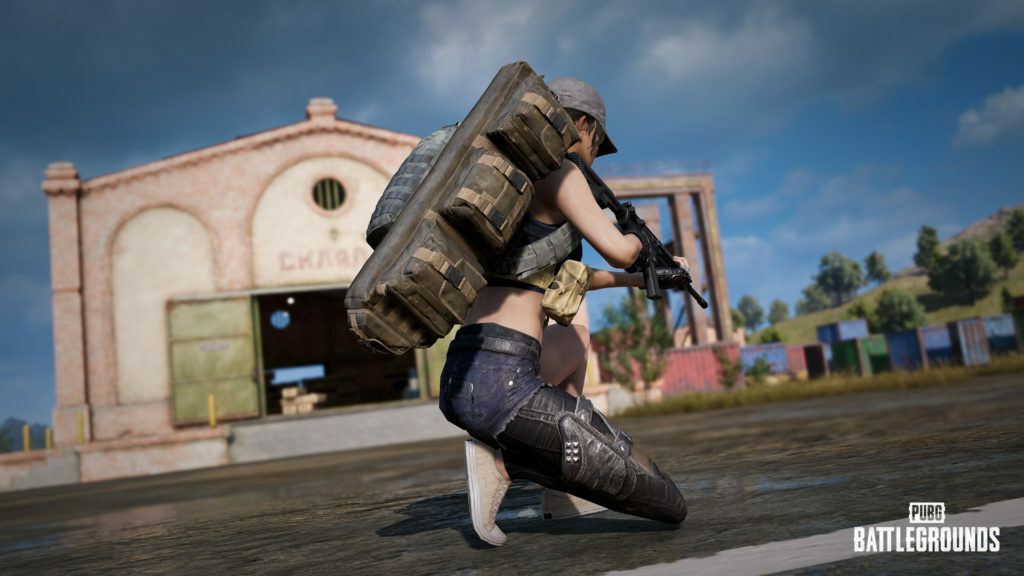
Tactical Pack


Update 16.2 kicks off with a new Tactical Gear, the Tactical Pack! Store almost any type of item and come up with all kinds of wacky play styles with this super backpack; turn into a missile silo with four Panzerfausts, or carry two extra sets of vests and helmets for emergencies, or dominate every combat range with an SMG, AR, and DMR combo! Or even better yet, why not carry four Mountain Bikes (because you can) so you and your squad would never need a vehicle again?
  • The Tactical Pack will:
    • Take up your primary weapon slot.
    • Have four attachment slots.
    • Spawn in every map.
    • Be available in Normal Matches, Custom Games, Training Mode, and Sandbox Mode(PC only).
    • Hold almost any item in its slots, including weapons, helmets, vests, item stacks, etc.
      • Stacks of an item (such as a stack of ammo) will take up a single slot, but a weight limit of 60 per slot applies to stack items only.
      • Weapons holding attachments will be stored as they are.
  • The Tactical Pack will not be able to store another Tactical Pack.
    • The Trunk in Porters cannot store a Tactical Pack.
  • Tactical Pack items are only accessible by the carrier.
    • To use the items, they must first be removed from the Tactical Pack.
  • When a player is holding the Tactical Pack in their hands, the normal looting interaction will be replaced with a new interaction to place the item directly into the Tactical Pack.
  • Weapons stored in the Tactical Pack will hold all their current attachments and ignore the "Replace Attachments" option when swapped out with another weapon.
    • ※ The "Replace Attachments" option allows you to enable/disable the automatic replacement of compatible attachments when picking up a new weapon.
  • If weapons are loaded before they're added to the Tactical Pack, they will maintain their loaded state when pulled back out.

Spotter Scope


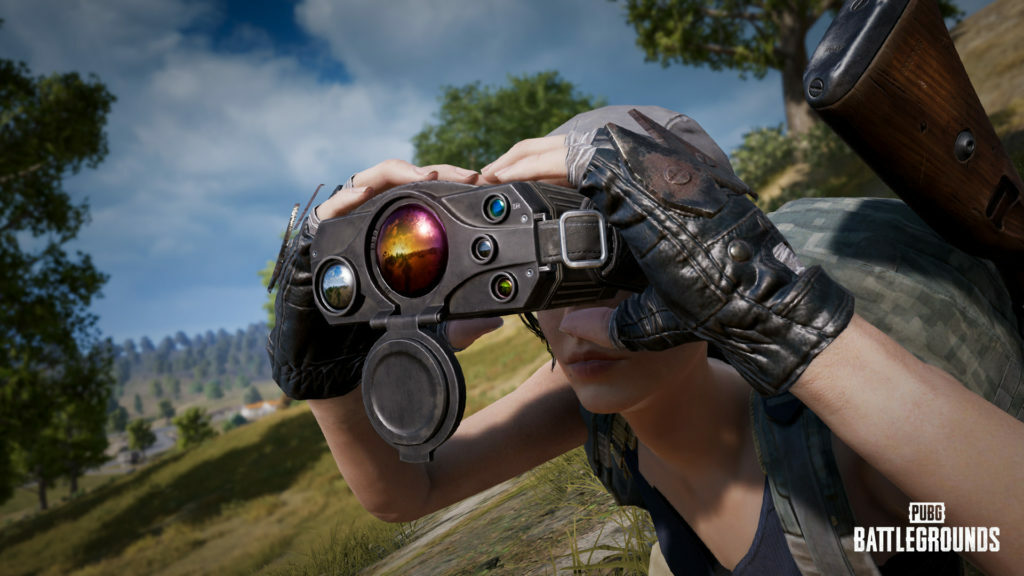
And we're bringing in another! Meet the new mid-range scouting Tactical Gear, the Spotter Scope! This special set of binoculars will help you spy and mark your enemies and enemy Drones while also allowing non-verbal communication with your squad!
  • The Spotter Scope will:
    • Take up your primary weapon slot.
    • Spawn in every map.
    • Be available in Normal Matches, Custom Games, Training Mode, and Sandbox Mode(PC only).
    • Be able to use in ADS mode.
      • The Spotter Scope will have a fixed 4x zoom magnification feature.
      • It will also provide real-time distance to the target you're aiming at.
        • The maximum calculative distance is 1KM, and the distance beyond that will return as "??M".
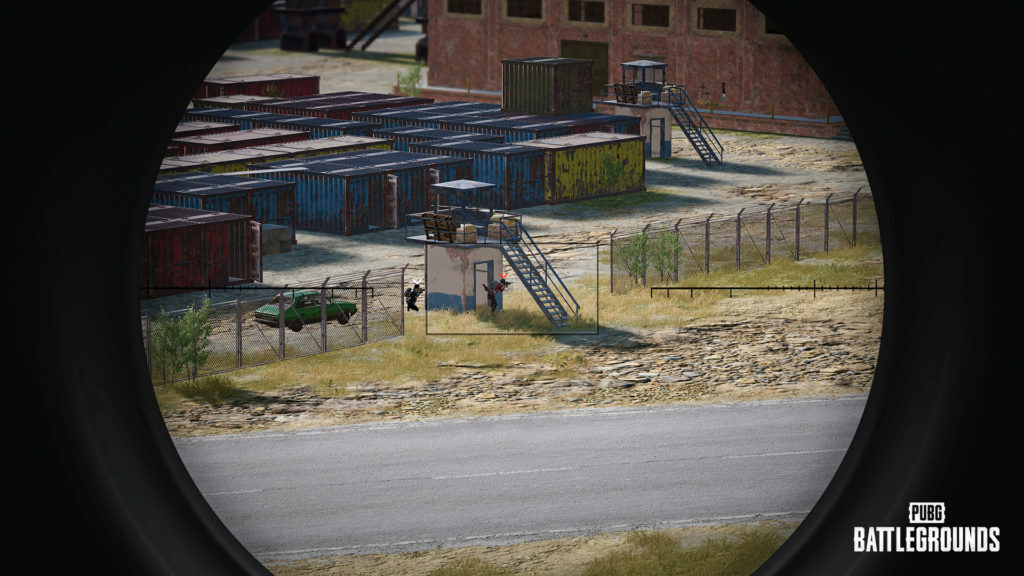
    • Allow you to spot and mark enemy players and Drones.
      • Every enemy player and Drone within 1KM of the Spotter Scope's sight will be marked with a passive marker (white icon).
        • The passive marker will be shown on the seer's screen only.
  • A targeting rectangle is located at the center of the Spotter Scope view.
    • If the user places the targeting rectangle to a marked enemy or Drone the passive marker will turn into an active marker (red icon).
    • The active markers will be automatically shared to the user's teammates.
    • There is no limit to the number of active markers that can be created.
      • Several enemies can be marked with the active marker at once, with each marker following its respective target.
    • When the Spotter Scope is no longer marking an enemy with an active marker, the active marker will continue to follow its target for 7 more seconds before disappearing.
      • To indefinitely maintain the active marker, the targeting rectangle of the Spotter Scope must continue to chase the enemy.


  • Normal Screen Pings can also be placed while using the Spotter Scope.
  • You will receive an Assist when the enemy you marked is killed by a teammate (only while the enemy has the active marker or within 5 seconds after the active marker disappears).
  • The Spotter Scope will not detect or mark players hiding behind smoke made by Smoke Grenades.
    • However, when an enemy hides behind cover or smoke after getting marked by the active marker by the Spotter Scope, the active marker will still follow them for 7 more seconds before disappearing.
Tactical Gear: Drone

The consistent color of the lights deployed Drones emit seemed to confuse many of our players, so we've changed the lights' colors to the following:
  • Deployed Ally Drone: Green lights
  • Deployed Enemy Drone: Red lights
Training Mode
Aim/Sound Lab


Enter the newly-added private Aim/Sound Lab for even better shooting and sound play practice!
  • You can enter this private practice area by interacting with either one of the three helipads in Training Mode.


  • After entry, you will be asked to choose between two modes: aim practice or sound practice.
    • Aim Practice
      • Choose your weapon in the weapon selection window, interact with the start button, and start practicing after a 5-second countdown.
      • Human figure-shaped targets will randomly spawn. The targets will first start out flat on the ground, then 3 to 7 random targets will come up simultaneously for you to shoot.
      • Once a practice session is over, the number of headshots and the total number of hit targets will show up on the screen.
    • Sound Practice
      • You will start out with a basic Deagle and a red dot sight.
      • Various sounds of primary weapons ranging from 15m~300m will be randomly played on targets.
        • The weapon name and distance of the gunshot will show on the screen.
      • Once you shoot the correct target, the target will fall back and come back up right away.
        • A kill message telling you what type of weapon the gunshot was from will pop up on the screen.
      • You will earn 10 points for shooting the correct target, 5 for the targets on either side of the correct one, and 0 for the rest.
        • There are different sound effects for each different score you earn.
      • The identical gunshot will move between different targets every 5 seconds until the player shoots a target.
      • Your total score will show up on the screen once a practice session is over.
  • Each practice session has a time limit of 1 minute, but you are free to leave the session any time by interacting with the exit button in front of you.
Improved Shooting Targets
  • Practice on the newly-added human-shaped and vehicle-shaped targets at the Aim/Sound Lab and shooting practice ranges!
  • You can see the different damages you inflict on the target based on the area you hit.
    • Headshot damage on human-shaped targets will be displayed as red.
      • Other body damage such as the torso, arms, legs, etc. will be displayed as white.
    • Damage to the driver's seat on vehicle-shaped targets will be displayed as red.
      • Other damage such as the wheels and body will be displayed as white.
Layout Rearrangement
The general layout of Training Mode has been shuffled up a bit to accommodate this update's new features and practice areas.
  • A Vehicle Display Booth displaying the three most recently added vehicles has been added.
  • An Item Display Booth displaying the three most recently added items has been added.
  • A vehicle shooting range with targets moving at the same speed as vehicles has been added.
  • The current warehouse holding the guns and attachments has been removed to enhance the mode's performance. Use the convenient Training Helper to summon weapons and items anytime, anywhere!
  • Dirt Bikes will now spawn instead of Scooters.
  • Due to the rearrangement of Training Mode, Camp Jackal has been removed from Warmode in Custom Matches.
Mode Entry Requirement
  • To encourage players to begin situational practices in various practice ranges, Training Mode will now also allow entry to players who completed Basic Training only.
Map Service
As we had already mentioned in our latest Map Service Plan announcement, Sanhok will be replaced with Haven in this update's rotation for Normal Matches. Prepare to battle newly-added bots, enemy players, and the Pillar in the return of the industrial island, Haven!

  • Normal Match
    • Erangel / Miramar / Taego / Karakin / Haven
  • Ranked Match
    • Erangel / Miramar / Taego
World
Fifth Anniversary Decoration
You'll be noticing several fifth anniversary decorations at Erangel and Taego in Normal Matches, but we'll be brief on the fifth anniversary explanation as separate announcements will be telling you more on our upcoming events, perks, and more!

Karakin
  • Several landscape updates have been made to balance out the battle experience in Karakin.
    • To provide a safer escape from Al Habar, trees and stone walls have been added around the area.
    • Trees, rocks, and a stone wall have been added to the set of houses located at the upper right of Bashara to reduce the area's vulnerability.
    • The topography of the mountains surrounding Hadiqa Nemo has been readjusted.
      • A mountain ridge has been added to block enemies' view.
      • The height of the mountains surrounding the area has been slightly lowered as they've been giving a bit too much of an advantage to many players.
      • The mountain's slope has become a little gentler with a bit more natural cover added as well.
  • Item spawn spots have increased in bunkers near Bahr Sahir and Hadiqa Nemo.
  • Directional alphabet signs such as E for East and X for explosive exit walls have been added to specific walls in Karakin's bunkers to assist lost players.
Haven
  • Bots acting like actual enemy players have been added to Haven.
  • An option to adjust the map's brightness has been added to Settings.
Care Package Smoke
  • The Colorblind Mode setting will no longer apply to the red smoke from Care Packages due to a new feature to be added in a later update.
Item Spawn Balance
We've heard your feedback that relatively useful weapons and their appropriate attachments should be spotted more frequently in Normal Match maps. Therefore, we ran thorough internal tests based on the data of our current item spawns and decided it'd be best to adjust the spawn rate of ARs, DMRs, SRs, and scopes in Erangel and Miramar to reduce the frustration players feel when they lose a battle after some unlucky looting.

※ This item spawn rate balance will only apply to Normal Matches.
Erangel
  • Assault Rifles (AR) and Designated Marksman Rifles (DMR) spawn rate increased by approximately 62%.
  • Sniper Rifles (SR) spawn rate increased by approximately 145%.
  • Foregrip spawn rate increased by approximately 33%.
  • Scope spawn rate increased by approximately 75%.
  • Stock spawn rate increased by approximately 38%.
  • Magazine spawn rate decreased by approximately 28%.
  • Heal Items and Throwables spawn rate decreased by approximately 13%.
  • Shotguns spawn rate decreased by approximately 27%.
  • Handguns spawn rate decreased by approximately 48%.
Miramar
Due to the widespread distribution of item spawn spots in Miramar, players relatively take a bit more time to loot. Therefore, the spawn rate of weapons and items has generally increased.
  • Assault Rifles (AR) spawn rate increased by approximately 105%.
  • Designated Marksman Rifles (DMR) spawn rate increased by approximately 123%.
  • Sniper Rifles (SR) spawn rate increased by approximately 317%.
  • Foregrip spawn rate increased by approximately 103%.
  • Scope spawn rate increased by approximately 100%.
  • Magazine spawn rate increased by approximately 10%.
  • Muzzle attachments spawn rate increased by approximately 12%.
  • Stock spawn rate increased by approximately 47%.
  • Armor spawn rate increased by approximately 12%.
  • Backpack spawn rate increased by approximately 16%.
  • Helmet spawn rate increased by approximately 20%.

Survivor Pass: Punk Wave


We first wish to thank you all for your patience. The next Survivor Pass: Punk Wave has finally arrived (with a better UI appearance too)! Turn into the punkiest star on the Battlegrounds by completing missions and collecting rewards.

We've also made some balance adjustments and general UI/UX enhancements for an even better Survivor Pass experience.
  • To differentiate the XP of Survival Mastery/Weapon Mastery with the Survivor Pass XP, the Survivor Pass XP will now be referred as Pass XP.
  • Maximum playtime to earn Pass XP per day: 6 hours → 8 hours
  • Maximum Pass XP obtainable per day: 7200 Pass XP → 9600 Pass XP
    • This does not affect the Pass XP rewards obtained from missions.
Main Lobby
  • A special BGM "PUBG 5th Anniversary" has been created and applied to the main lobby – Erangel and Taego won't be the only ones celebrating our upcoming fifth anniversary!
UI/UX
  • The current icons on the Hideout and Store tabs have been confusing some of our players, so they've been modified to deliver a clearer message.
  • Regions with map selection can now find lore-related introductions added to each map in the map select page.
  • (Console) The general design of the hold key icons has been updated.
Performance
  • A new compression technology has been implemented to every platform to reduce game size and improve decompression speed.
    • This is expected to help relieve in-game hitches, especially on low-end hardware.
  • Frame rates should be improved thanks to optimizations for render-heavy situations such as navigating cities.
Bug Fixes
Gameplay
  • Fixed the awkward character movement in Replay mode when a player jumps off a Motorbike.
  • Fixed the remaining Drone icon of an ally's on the minimap in Spectator Mode even after the teammate dropped the Drone.
  • Fixed the missing item issue in the Drone's inventory after using the Drone to pick up an item.
  • Fixed the invisible Drone issue when deploying a Drone while using an emote.
  • Fixed the awkward tripod issue of the Mk12 when using the weapon while prone.
  • Fixed the white weapon icon of the player's Drone even after the Drone is destroyed.
  • (PC) Fixed the awkward character appearance of the player using a Drone after handing a weapon to that player through the Sandbox UI, and the black screen issue when the Drone is recalled.
  • (Console) Fixed the notification message popping up during the login loading screen and disappearing less than 5 seconds later.
World
  • Fixed the disappearing rocks issue when entering ADS mode at a certain location in Karakin.
  • Fixed the missing flame effect when throwing a Molotov at destroyable surfaces in Karakin.
  • Fixed the missing siren sound alerting the first Black Zone in Karakin.
  • Fixed collision, texture, performance, and more general issues in Karakin.
UX/UI
  • Removed the Vehicles image from the world map in Training Mode.
  • Fixed the appearance of pans in the Career tab for different level poses after equipping certain equipment skins.
  • Fixed the issue of being able to Lock weapon items that are unable to be disassembled in the Customize tab.
  • (PC) Fixed the bunched-up looked of the Ranked season's countdown sign.
Items & Skins
※ Clipping issue: Graphics that are shown outside the visible part of an image/object.
  • Fixed the invisible RYAN's Slippers issue when equipping the item with a Divemaster Suit.
  • Fixed the clipping issue of the Blood Hound Jacket when using an emote where the character raises their arms.
  • Fixed the missing Partner logo issue when equipping the WackyJacky101's VSS skin.

Rocket League - Rocket League gets Animated In Season 6

Link to Rocket League RSS Feed

Rocket League gets Animated In Season 6

Posted: 07 Mar 2022 10:01 AM PST


WE'LL BE RIGHT BACK AFTER THIS COMMERCIAL BREAK

From the studio that brought you Rocket League, Psyonix proudly presents Season 6, an all-new adventure featuring our beloved cast of cars. This season introduces an animation-themed Rocket Pass featuring the new Nomad van, along with a never-before-seen Neo Tokyo (Comic) Variant Arena. As the season continues, we'll release items from the Fornax Series, uncage the legendary Black Fennec, and introduce a smashing Mid-Season Event that showcases a New Game Mode.

Coming soon to own on Wednesday, March 9 at 8 a.m. PST (4 p.m. UTC) and DVD.


COMING UP NEXT

This Season's Rocket Pass is packed tighter than a clown car. Fans of the Merc Hitbox rejoice! We're going cross country with the bouncing Nomad van, complete with road trip stickers on the Well Traveled Decal.

Be careful while channel surfing—the mysterious Nomster has been spreading rapidly through the game. We're not exactly sure WHAT he is yet, but he's showing up in new Wheels, a Goal Explosion, even a new Antenna that somehow devours the grille of the Nomad! Not cool Nomster, not cool!


BONUS FEATURES

The fun doesn't stop with the Rocket Pass; we've got the Fornax Series coming into play as Blueprints shortly after the Season begins. Featuring the stylish Mamba Car, this series mixes new and old with some totally re-imagined classics. Slip on a pair of Pixelated Shades: Multichrome or get holographic with the new Troika: Roasted Wheels. We've also got a new Shade Raid Goal Explosion that transforms every match into the pages of a comic book.

Arenas are undergoing a bit of a transformation as well, as the new Neo Tokyo (Comic) Variant comes into the game.

A new batch of Tournament Rewards is rolling in, and it's a whole bag of tricks. Toilet paper rolls, heavy dumbbells, and wheels full of teeth all mix together to make some of our zaniest rewards yet.

Don't touch that dial! Season 6 has another surprise in store. Later this Season, a new Limited Time Event will debut, releasing an entirely new Mode that's sure to be a smash hit. Details to come, but for now, we'll just say we hope you like bumping!


AVAILABLE IN THE ITEM SHOP

It looks like the devs used permanent marker on this one. That's right, the much anticipated Black Fennec is coming to the Item Shop in Season 6, so get your credits ready. This instant classic will pair perfectly with your favorite Esports Decals and Titanium White Wheels.

We're also bringing in new Starter and Standard Bundles packed full of classic items like the Jäger 619, Toon-Hydro Trail, Toon Goal Explosion (Titanium White), and more!


Season 6 kicks off Wednesday, March 9 following a game update on March 8 at 4 p.m PST.

Dead by Daylight - The Sadako Rising Chapter is Coming March 8th.

Link to Dead by Daylight RSS Feed

The Sadako Rising Chapter is Coming March 8th.

Posted: 08 Mar 2022 09:00 AM PST

A lil somethin somethin: You can find the details for this event on the announcement page [url=https://steamcommunity.com/ogg/381210/announcements/detail/3112550278931295893]here[/url].

Path of Exile - 3.17.2 Patch Notes Preview


3.17.2 Patch Notes Preview

Posted: 02 Mar 2022 12:28 PM PST

A lil somethin somethin: You can find the details for this event on the announcement page [url=https://steamcommunity.com/ogg/238960/announcements/detail/3135073259453749687]here[/url].

3.17.2 Patch Notes Preview

Posted: 02 Mar 2022 12:28 PM PST

Sometime this week or early next week, we're planning to deploy the 3.17.2 patch which introduces several improvements including an {LINK REMOVED}. Check out a preview of its patch notes below.

The following patch notes are still subject to change prior to the patch's deployment. We'll deploy the 3.17.2 update on consoles as soon as possible after its release on PC.

3.17.2 Patch Notes

This patch contains various improvements and bug fixes of both small- and medium-importance.

Improvements
  • The Corrosive Hunger debuff in The Infinite Hunger boss fight now provides -1% Physical Damage Reduction and -1% Chance to Evade per stack (previously -400 to Armour and Evasion Rating per stack).
  • Corrosive Hunger stacks are now lost when The Infinite Hunger drowns you and teleports you away.
  • Oil that has been set alight is now treated as Burning Ground, and applies a Burning Ground debuff, rather than Burning Oil.
  • The Incendiary Archnemesis modifier now gives the monster less duration of Ignites on self, rather than reduced duration on Ignites of self. This change is to primarily address an issue where characters with the Blackflame Unique Ring equipped were unable to Ignite monsters with this Archnemesis modifier.
  • The number of Prefix and Suffix modifiers on an item is no longer preserved when rerolling modifiers using an Eldritch Chaos Orb.
  • Added a new '/atlaspassives' chat command that details the sources of your Atlas Passive Points, and those you may still be missing from quests.
  • Added a notification for when you have received a Map crafting option.
  • The Fragment Stash Tab can now hold Eldritch and Maven Invitations.
  • Items contained in the Gem and Flask Stash Tabs are now listed alphabetically within categories.
  • The "Convert Maps" button on the Map Stash Tab is now only usable if you have at least 1 non-remove only Map Stash set to the current map series.
  • Showing Advanced Mod Descriptions is not any option any more, it is now always on.
  • Bows in Standard with one-handed local Added Fire, Cold, Lightning and Chaos Damage weapon prefix modifiers can now have a Divine Orb used on them to obtain the two-handed modifier values introduced in 3.17.0.
  • The Vaal Omnitect and Atziri, Queen of the Vaal are now also untargetable whilst they are invulnerable, preventing Minions from prioritising them over other monsters.
  • Further improved level generation of Blighted Maps so that they fail to open less often.
  • Added a short cooldown to the triggered spells of Morgrants, the Deafening to prevent enormous numbers of Skill triggers against Player Minions.
  • Aura Skills that have had their Reservation changed to a cost through Divine Blessing Support can now be supported by Arcane Surge.
  • Trial of Ascendancy Portals now detail what kind of Offering they contain when you encounter them in Maps.
  • Updated the description on Divine Blessing Support to state that it cannot support Stance Skills.
  • The Invisible Buff Effect Microtransaction can now be applied to Plague Bearer, allowing you to hide its visual effects.
Bug Fixes
  • Fixed a bug where a totemified channelling skill with a cooldown did not apply the cooldown when you used the skill, such as Winter Orb Totems with the Black Zenith Unique Gloves.
  • Fixed an issue where Drox, The Warlord's Glove Cascade was dealing more damage than intended in Maven's "The Elderslayers" Invitation.
  • Fixed a bug with Kirac Missions where Shaper- and Elder-Influence was not applying correctly to Maps.
  • Fixed a bug where the Lesser Searing Exarch Implicit modifier that grants 8% increased Attack Speed was not working correctly.
  • Fixed a bug where the Elevated Sextant modifier that causes Areas to contain 2 Additional Essences and provides a chance for monsters imprisoned by Essence a chance to contain a Remnant of Corruption had 3 uses, instead of 15 uses.
  • Fixed a bug where Eldritch Orbs of Annulment, Eldritch Chaos Orbs and Eldritch Exalted Orbs could be used on items that did not have empty Sockets.
  • Fixed a bug where the Megalomaniac Unique Jewel could not generate the Aggressive Defence, Blood Artist or Phlebotomist Cluster Jewel Notables.
  • Fixed a bug where the maximum Resistance modifiers introduced for Shields in 3.17.0 were unable to be changed to another type of Resistance through Harvest crafting options.
  • Fixed a bug where crafting recipe unlock interactables were sometimes not present in the Caldera, Marshes, Promenade and Wasteland Maps
  • Fixed an issue where you could sometimes be disconnected for performing too many actions if you had Berserk bound to left-click.
  • Fixed a bug where the Captivated Interest Atlas Passive Skill was not working correctly.
  • Fixed a bug where the targeting behaviour of minions summoned by The Dancing Dervish was not working correctly with Predator Support.
  • Fixed a bug with the Stormfire Unique Ring where the increased Burning Damage for each time you have Shocked a Non-Shocked Enemy Recently was not properly keeping track of your most recent Shocks.
  • Fixed an issue where the "Monsters steal Power, Frenzy and Endurance charges on Hit" modifier description was sometimes not visible on Maps with the modifier.
  • Fixed a bug where Whirling Blades would attempt to hit a target again if it evaded the attack.
  • Fixed a bug where Unique Maps that were corrupted to Rare Maps could sometimes retain their Unique art.
  • Fixed an issue where the "Prevent others from using your Map Portals" option did not apply to Map Portals in Karui Shores.
  • Fixed an issue where Cremation could sometimes be invisible when supported by Spell Echo.
  • Fixed a bug where The Eater of Worlds and The Searing Exarch icons could sometimes incorrectly display on items on the ground.
  • Fixed a bug where the Extinguish debuff icon was displayed as a buff.
  • Fixed a bug where temporary beam effects for item filters were not so temporary if they continued from a permanent beam.
  • Fixed an unintended visual interaction between the Indomitable Aegis Aurora and Myrmidon Weapon Effect Microtransactions.
  • Fixed an issue where the Stygian Plague Bearer Microtransactions would sometimes not fully apply to characters.
  • Fixed a few wonky interactions with Warcry skills and some Character Effect microtransactions.
  • Fixed a bug where the audio for Kinetic Bolt could stutter and cause the client to freeze.
  • Fixed a client crash that could occur with Phantasmal Seismic Trap.

An Update to the Fragment Stash Tab

Posted: 01 Mar 2022 12:38 PM PST

In the upcoming 3.17.2 update, we're improving the Fragment Tab so that it can hold Eldritch and Maven fragments. Alongside this added storage, the patch includes some other improvements and fixes. We'll deploy it as soon as we can, but in the meantime, check out the look of the updated Fragment tab below:


Core Supporter Pack Concept Art - Ravager

Posted: 28 Feb 2022 01:17 PM PST

Today we're continuing our series showcasing concept art from our 2022 Core Supporter Packs. Take a look at the {LINK REMOVED} below! You can check out the concept art from the {LINK REMOVED}, {LINK REMOVED} and {LINK REMOVED} Core Supporter Packs by clicking the links on the pack name.


Siege of the Atlas Talent Competition

Posted: 27 Feb 2022 12:50 PM PST

We're launching a Talent Competition themed around any content introduced in the Siege of the Atlas expansion! Your talent could be fan art, poems, videos, cosplay, baking, crafts and anything you excel in! As usual, we have prepared an awesome prize pool that includes Path of Exile merchandise and in-game microtransactions.

Prizes
Top Three Winners
  • Signed Path of Exile {LINK REMOVED}
  • Signed Path of Exile Art Print
  • Signed Path of Exile Comic
  • {LINK REMOVED}
  • Your choice of two Path of Exile T-shirts - (Chaos Orb, Shaper or Untainted Paradise)*
  • {LINK REMOVED}
  • Your choice of an Armour Set (an Armour Set from the list below)
  • Your choice of a Weapon Effect (a Weapon Effect from the list below)
  • Your choice of Footprints Effect (any Footprints Effect from the store)
4-5th Place
  • Signed Path of Exile Art Book
  • Your choice of one Path of Exile T-shirt - (Chaos Orb, Shaper or Untainted Paradise)
  • Foam Exalted Orb
  • Your choice of an Armour Set (an Armour Set from the list below)
  • Your choice of a Weapon Effect (a Weapon Effect from the list below)
  • Your choice of Footprints Effect (any Footprints Effect from the store)
6-10th Place
  • Your choice of one Path of Exile T-shirt - (Chaos Orb, Shaper or Untainted Paradise)
  • Foam Exalted Orb
  • Your choice of a Weapon Effect (a Weapon Effect from the list below)
  • Your choice of Footprints Effect (any Footprints Effect from the store)
11-20th Place
  • Foam Exalted Orb
  • Your choice of a Weapon Effect (a Weapon Effect from the list below)
Runners-Up
  • Your choice of Footprints Effect (any Footprints Effect from the store)
*Please note that T-shirt style is subject to size availability and may be substituted for a T-shirt in another style. In this scenario, we will work with you to meet your preferences.

Microtransaction Prize Pool
List of Armour Sets
List of Weapon Effects
How to Enter

Just post your submission to this thread to be entered into the competition. It's ideal if your content is easy to consume. A general guide for this is that your submission should take no longer than three minutes to read, listen to or view. It's permitted to post content that is longer than three minutes but in some cases it may put your submission at a disadvantage if it's significantly difficult to engage with your content.

The winning submissions will be selected based the following criteria:

  • How skillfully your talent has been executed
  • How true it remains to the theme of Path of Exile
  • How compelling or entertaining the submission is
Conditions
  • The competition will run from the time of this post until Monday the 28th of March at 5pm NZT (27th of March at 9pm PDT). Submissions made after this time will not be counted. We'll post the winners sometime in the following days.
  • Any work that is submitted must be your own and must be created after the launch of this competition.
  • Multiple submissions are welcome.
  • If you want to create a montage or mash-up of other artists' work or videos, this is permitted as long as it follows all legal guidelines of fair use standards.
Best of luck to everyone who is participating in the competition!


PUBG - Announcing the Fan Art Contest: LAND Winner!

PUBG - Announcing th...

Powered by Blogger.